If your application sends the Claude API the same system prompt, tool definitions, or context on every call, you’re paying full price for tokens Claude already processed a moment ago. Prompt caching fixes that. I added it to a project last week and the cost drop was bigger than I expected, so here’s what it actually does, how the pricing works, and the mistakes that will quietly break it.
What prompt caching does
Prompt caching lets Claude reuse the processed state of a prompt prefix instead of recomputing it on every request. The first call that includes a given prefix writes it to the cache. Every subsequent call with that same prefix reads from the cache instead of paying full input price for it.
The prefix follows a fixed order: tools, then system prompt, then messages. That means static content, like tool schemas and system instructions, should sit first. Anything that changes per request, like the user’s message or a timestamp, goes last. Caching only works on the prefix, so if the volatile part comes before the stable part, there’s nothing stable left to cache.
There are two ways to enable it:
- Automatic caching: add one
cache_controlfield at the top level of the request. The system finds the last cacheable block and moves the breakpoint forward as the conversation grows. This is the simplest option for multi-turn chat. - Explicit breakpoints: place
cache_controlon individual content blocks, up to 4 per request. Useful when different sections change at different frequencies, for example tool definitions that rarely change versus context that updates daily.
The pricing, and why it’s not free money
Caching introduces its own pricing tier, and it’s easy to misread at first glance:
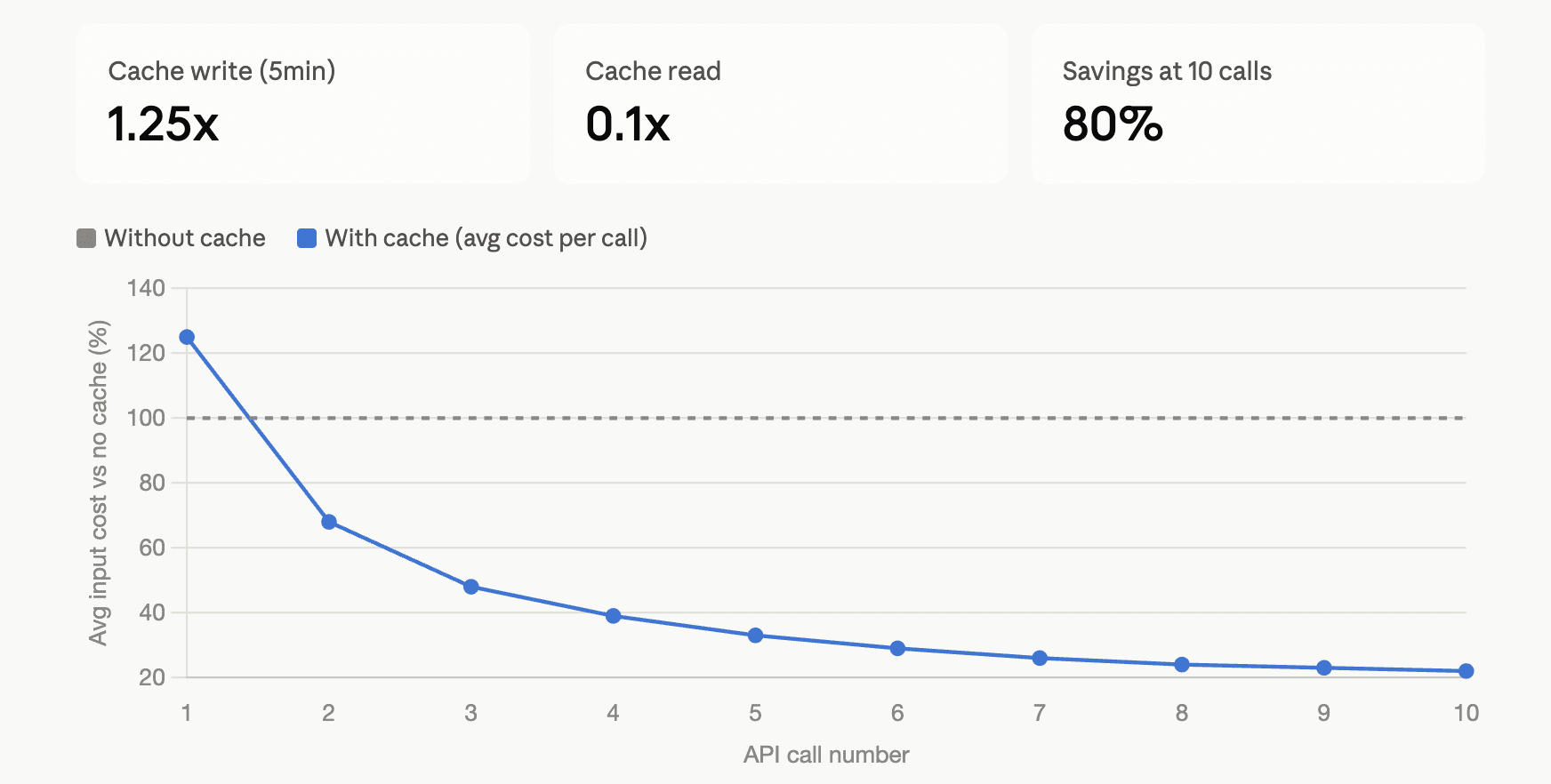
- A 5-minute cache write costs 1.25x the normal input price.
- A 1-hour cache write costs 2x the normal input price.
- A cache read costs 0.1x the normal input price, a 90% discount.
So the first call is more expensive than not caching at all. You start seeing savings once the same prefix gets reused. With the 5-minute cache, you break even after a single hit. Average that out over ten calls with a stable prefix and you’re paying roughly a fifth of what you’d pay without caching. Over a long agent loop that reuses the same tool definitions and instructions hundreds of times, it settles close to the full 90% off that cached portion.
If a workflow only calls the API once or twice with a given prefix, caching isn’t worth it. It’s built for repetition: RAG pipelines re-sending the same retrieved context, agents re-sending the same tool schemas on every loop iteration, chat apps re-sending growing conversation history.
Where I actually got tripped up
The prefix has to be byte-identical. Not semantically similar, not “basically the same.” One extra space, a reordered JSON key, a regenerated timestamp anywhere before your breakpoint, and the hash no longer matches. You pay for a fresh write and get no read.
The cache doesn’t search for stable content, it only finds prior writes. This one cost me some time. I assumed that if my system prompt hadn’t changed in months, the lookback would eventually find it. It won’t. A cache entry only exists at a position because an earlier request placed its breakpoint there and wrote it. The system checks up to 20 positions backward from your breakpoint, looking for an entry a previous request actually created, not for content that happens to be stable. If you put your breakpoint on the block that changes every request, like the incoming user message, you’ll never get a hit, because nothing was ever written there. Move the breakpoint to the last block that stays identical across calls.
Nothing in the response confirms a hit except the usage fields. There’s no visible flag that says “cached.” You have to check:
cache_read_input_tokens   // tokens read from cache
cache_creation_input_tokens // tokens newly written to cache
input_tokens               // tokens after the last breakpoint, never cached
I shipped an early version without checking these and just assumed it was working because nothing errored. It wasn’t hitting the cache at all, because my breakpoint sat on a block containing per-request context.
What invalidates the cache
The cache follows the same hierarchy as the prefix: tools, then system, then messages. A change at any level invalidates that level and everything after it. In practice, the things that catch people off guard:
- Changing tool definitions invalidates everything, tools, system, and messages.
- Toggling web search or citations invalidates the system and message cache.
- Adding or removing images invalidates the message cache.
- In some languages, like Swift or Go, JSON key ordering isn’t guaranteed to be stable, which silently breaks the hash on tool_use blocks.
Worth doing if
Your app resends the same system instructions, tool schemas, or large context blocks more than a couple of times. If that’s true, prompt caching is close to a free win once it’s set up correctly. If it’s a one-off call with no repetition, skip it, the write premium isn’t worth paying.